



Employees spend nearly 80% of their work hours on low-value repetitive tasks. Writing boilerplate code, debugging predictable issues, maintaining documentation, and repeating integrations consume valuable time that could otherwise be spent on innovation.
Each repeated function, test case, and manual integration creates friction in the development process. Over time, that friction compounds, slowing delivery and limiting how quickly teams can move from ideas to production.
AI-powered development assistants are designed to reduce this burden.
Tools such as GitHub Copilot and Microsoft Copilot provide intelligent suggestions, automate repetitive work, and help developers focus on the logic and design that truly move projects forward. These tools are not meant to replace developers. Instead, they enhance developer productivity by removing low-value tasks from daily workflows.
The most impactful ways Copilot reduces developer toil include:
- Automating Boilerplate Code: Copilot generates repetitive structures instantly so developers can focus on application logic and architecture.
- Accelerating Debugging: AI-powered suggestions highlight errors and recommend fixes, reducing the time spent troubleshooting.
- Streamlining Documentation: Copilot generates inline comments and summaries, improving clarity without requiring manual documentation effort.
This blog explores three Copilot use cases that free developers from repetitive work. You’ll see practical benefits, explore features, and gain actionable best practices.
| As Jacob Saunders, EVP of Professional Services at Atmosera, explains:
“AI tools that remove repetitive tasks don’t replace creativity; they amplify it, allowing teams to focus on strategy and innovation.” |
By the end of this article, you will understand how Copilot can help your teams save time, reduce errors, and concentrate on solving meaningful problems.
3 Copilot Use Cases for Developers That Reduce Daily Coding Toil
Developer toil often appears in subtle ways: repetitive code patterns, slow review cycles, or extended onboarding for new engineers. These tasks quietly drain momentum across teams.
Even when developers remain busy, progress slows because energy is spent on maintaining workflows rather than building solutions.
Below are three Copilot use cases that reduce this friction, helping teams spend less time on repetition and more time creating value.
1. Automating Routine Coding Tasks
Nearly every development team now uses AI in some capacity. In fact, research shows that over 90% of developers use AI tools during their workflow.
Despite this shift, developers still spend a large portion of their time writing boilerplate code, creating API integrations, and repeating common programming patterns.
Copilot helps reduce this burden by automatically generating code suggestions that align with the developer’s context and coding style.
Instead of manually writing repetitive structures, developers can focus on higher-value engineering work.
Key benefits of automating routine coding tasks include:
- Boilerplate Automation: Copilot generates common structures instantly, reducing repetitive manual coding.
- API Integration Support: Copilot suggests functions and endpoints as developers write code
- Error Reduction: Real-time suggestions help prevent common mistakes and improve overall code quality.
- Team Consistency: Copilot helps developers follow shared coding standards, improving consistency across teams.
For example, building multiple API integrations without AI support often requires repeating similar code across different modules. Copilot can generate these patterns instantly, allowing developers to complete integrations faster and with fewer errors.
Instead of repeating the same code patterns, developers can focus on designing better systems and solving complex problems.
The result is faster delivery cycles, smoother workflows, and higher developer satisfaction.
Give Your Developers Their Time Back
Learn how Copilot use cases for developers transform automation and guidance into measurable productivity gains.
2. Streamlining Code Reviews and Collaboration
Code reviews are essential to maintaining quality, but they often slow down development when pull requests accumulate, and teams struggle to review changes quickly.
Copilot helps reduce review friction by identifying potential issues early and providing suggestions that improve code before it reaches review stages.
This means reviewers spend less time fixing basic errors and more time evaluating architectural decisions and performance improvements.
Key benefits for code reviews and collaboration include:
- Error Detection: Copilot highlights potential issues during development, reducing bugs before code reviews begin.
- Consistent Code Style: AI suggestions help maintain consistent coding standards across multiple teams.
- Collaborative Development: Developers can work from a shared baseline of best practices, making collaboration smoother.
- Reduced Bottlenecks: Copilot minimizes unnecessary back-and-forth revisions, helping teams approve changes faster.
When code quality improves earlier in the development cycle, pull requests move faster and developers can transition quickly to the next phase of work.
This leads to faster project completion, smoother handoffs, and less rework across teams.
3. Accelerating Learning and Skill Development
Onboarding new developers can be expensive and time-consuming. Learning unfamiliar frameworks or languages often slows early project progress.
Copilot acts as an AI-powered development assistant, offering examples, explanations, and suggestions directly within the coding environment.
This guidance helps developers learn faster while maintaining coding standards and project consistency.
Best practices Copilot supports for learning and skill development include:
- Real-Time Code Examples: Copilot generates context-aware examples demonstrating proper framework usage.
- Inline Code Explanations: AI-generated explanations help developers understand logic faster.
- Standards Alignment: New developers follow established coding patterns from day one.
- Documentation Support: Copilot generates comments and summaries that reinforce understanding.
For example, a new developer joining a team can quickly understand existing coding practices and complete tasks faster with Copilot’s assistance.
As a result, ramp-up time shortens, knowledge spreads more evenly across teams, and projects progress more efficiently.
Train Your Developers to Use Copilot the Right Way
Turn Copilot from a helpful assistant into a consistent productivity driver.
Copilot AI for Developers: Enhancing Productivity Beyond Coding
Development work extends beyond writing code. Documentation, testing, meetings, and project coordination consume a large portion of developer time.
The 2024 State of Developer Productivity report shows that 58% of development teams lose more than five hours per developer each week to unproductive work.
Copilot helps reduce this lost time by assisting with tasks that traditionally fall outside coding itself.
These capabilities include generating unit tests, summarizing documentation, and organizing meeting notes.
When integrated with platforms such as Microsoft 365, Copilot can also help developers track tasks, identify priorities, and automate routine administrative work.
Key productivity improvements beyond coding include:
- Automated Unit Tests: Copilot suggests test cases based on the context of the code.
- Documentation Assistance: Inline comments and summaries improve onboarding and knowledge sharing.
- Meeting Note Summaries: Copilot captures and organizes discussions to improve project clarity.
- Task Tracking Integration: Developers can monitor priorities and workflows more effectively.
These capabilities allow developers to focus on strategic development decisions rather than operational overhead.
GitHub Copilot Features for Developers: Leveraging Advanced Capabilities
GitHub Copilot extends beyond simple code suggestions. Advanced capabilities allow developers to handle complex development tasks more efficiently while maintaining security and compliance.
These features help teams work across larger codebases without sacrificing quality.
Key advanced capabilities include:
- Multi-File Editing: Copilot suggests updates across multiple files, simplifying large development tasks.
- Natural Language Prompts:Developers can describe what they want in plain English, and Copilot generates functional code.
- Personalized Style Adaptation: Copilot learns team coding standards and applies them consistently.
- Security Filters: Built-in safeguards prevent unsafe code suggestions and reduce reuse of public repository code.
- Enterprise Compliance Support: Copilot aligns with enterprise development environments and Azure deployment standards.
By leveraging these capabilities, organizations can write, review, and deploy code faster while maintaining governance and security standards.
| Learn how you can further safeguard your enterprise’s infrastructure, data, and more: |
Key Takeaways: Copilot Benefits for Teams and Leaders
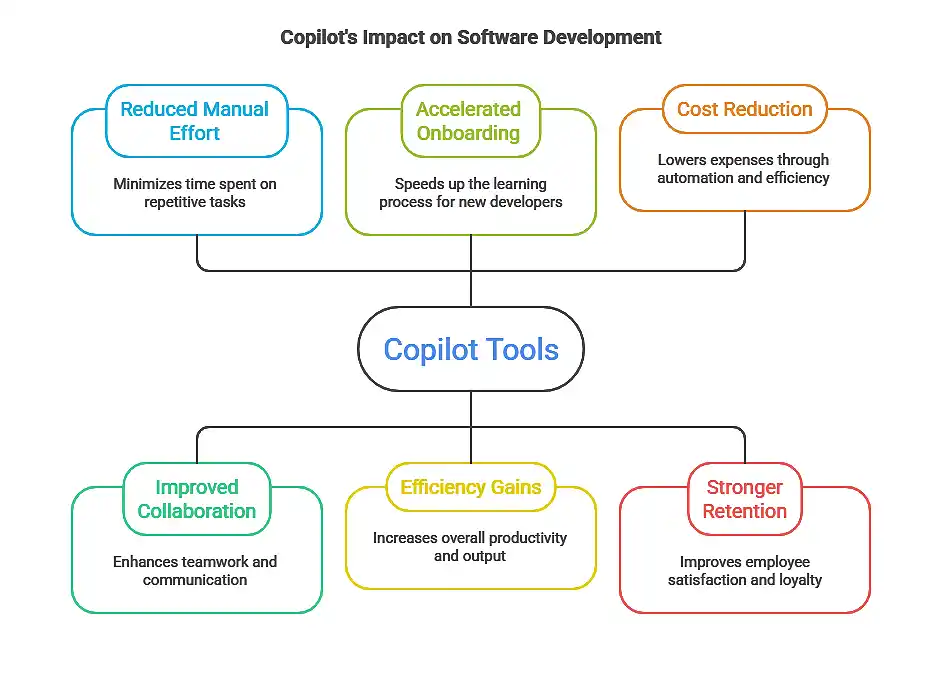
Copilot reduces repetitive development work while improving collaboration and accelerating onboarding.
The benefits extend beyond engineering teams, creating measurable impact for organizations through improved productivity and reduced development costs.
The three most impactful Copilot use cases include:
- Automating Repetitive Coding Tasks: Removes boilerplate work and speeds development.
- Streamlining Reviews and Collaboration: Improves consistency while reducing bottlenecks.
- Accelerating Learning and Onboarding: Shortens ramp-up time and spreads knowledge across teams.
The outcomes are tangible:
- Faster development cycles
- Higher code quality
- Reduced hiring pressure
- Improved developer retention
Leaders who integrate Copilot strategically empower teams to focus on innovation instead of repetitive work.
Additional Copilot Benefits for Developers
Copilot delivers value beyond coding assistance by supporting broader developer workflows.
These capabilities strengthen productivity across documentation, collaboration, and testing processes.
| Benefit | Description | Outcome |
| Automated Documentation | Generates documentation as developers write code | Reduces manual documentation effort |
| Meeting Summaries | Captures key points from collaboration discussions | Improves clarity and follow-up |
| Personalized Learning | Suggests examples and coding guidance | Accelerates skill development |
| Task Tracking Integration | Integrates with Microsoft 365 tools | Improves workflow visibility and reduces missed deadlines. |
| AI‑Driven Testing Suggestions | Recommends test cases based on code context | Strengthens reliability and reduces post-deployment errors |
These additional capabilities ensure Copilot improves both technical performance and organizational productivity.
Partner with Atmosera to Implement Copilot Use Cases for Developers
Copilot delivers practical outcomes for development teams, and the right Copilot use cases for developers can dramatically reduce repetitive work while improving delivery speed.
Automation reduces repetitive work, collaboration improves efficiency, and onboarding accelerates.
The result is higher-quality code, fewer errors, and developers who can focus on solving meaningful problems.
Atmosera helps organizations integrate Copilot into enterprise development environments by providing governance frameworks, training, and implementation guidance.
Our approach ensures organizations achieve measurable ROI while maintaining security and compliance.
Key outcomes include:
- Reduced Developer Toil: Teams spend less time on repetitive tasks.
- Improved Azure Development Efficiency: Projects accelerate while maintaining governance standards.
Move Faster Without Burning Out Your Team
Discover how Copilot use cases for developers reduce low-value work and keep engineers focused on innovation.